
If you work with Microsoft identity long enough, you’ll eventually learn this lesson the hard way:
You can lock yourself out of your own tenant.
I’ve seen this happen to engineers, MSPs, and internal IT teams. Sometimes it’s during a routine Conditional Access change, other times it’s during a security hardening sprint. Everything seems fine—until suddenly, no one can sign in.
That’s why break-glass accounts are always the first thing I set up in every tenant. I do this before Conditional Access, before enforcing MFA, and before any security tuning.
This post explains why break-glass accounts matter, how I design them, and what mistakes I see people make all the time.
What Is a Break-Glass Account?
A break-glass account is an emergency-only administrative account designed to help you regain access to your tenant when something goes wrong. (Emergency Recovery: What to Do When Your Global Admin for Office 365 A1 is Deleted, 2025)Think of it as the fire alarm behind glass:
- You don’t use it daily
- You don’t assign it to anyone’s normal workflow
- You hope you never need it
- But when things break, it saves you
In Microsoft 365 or Microsoft Entra ID, this account sits outside the usual controls. That way, if MFA, Conditional Access, or your identity provider fails, you still have a way in. (Microsoft Office 365—Do you have a false sense of cloud security?, 2020)
Why I Never Skip Break-Glass Accounts
Here are real scenarios I’ve personally seen or tested:
- The Conditional Access policy blocks all admins by mistake
- MFA service outage prevents sign-in
- Identity Protection flags all admin accounts as high risk
- Federation or hybrid identity issues break authentication
- A junior admin “cleans up” exclusions they didn’t fully understand
Without a break-glass account, you might have to open a Microsoft support ticket. That’s the last place you want to be during an outage.
My Break-Glass Design (What I Actually Do)
This is how I configure break-glass accounts in real tenants.
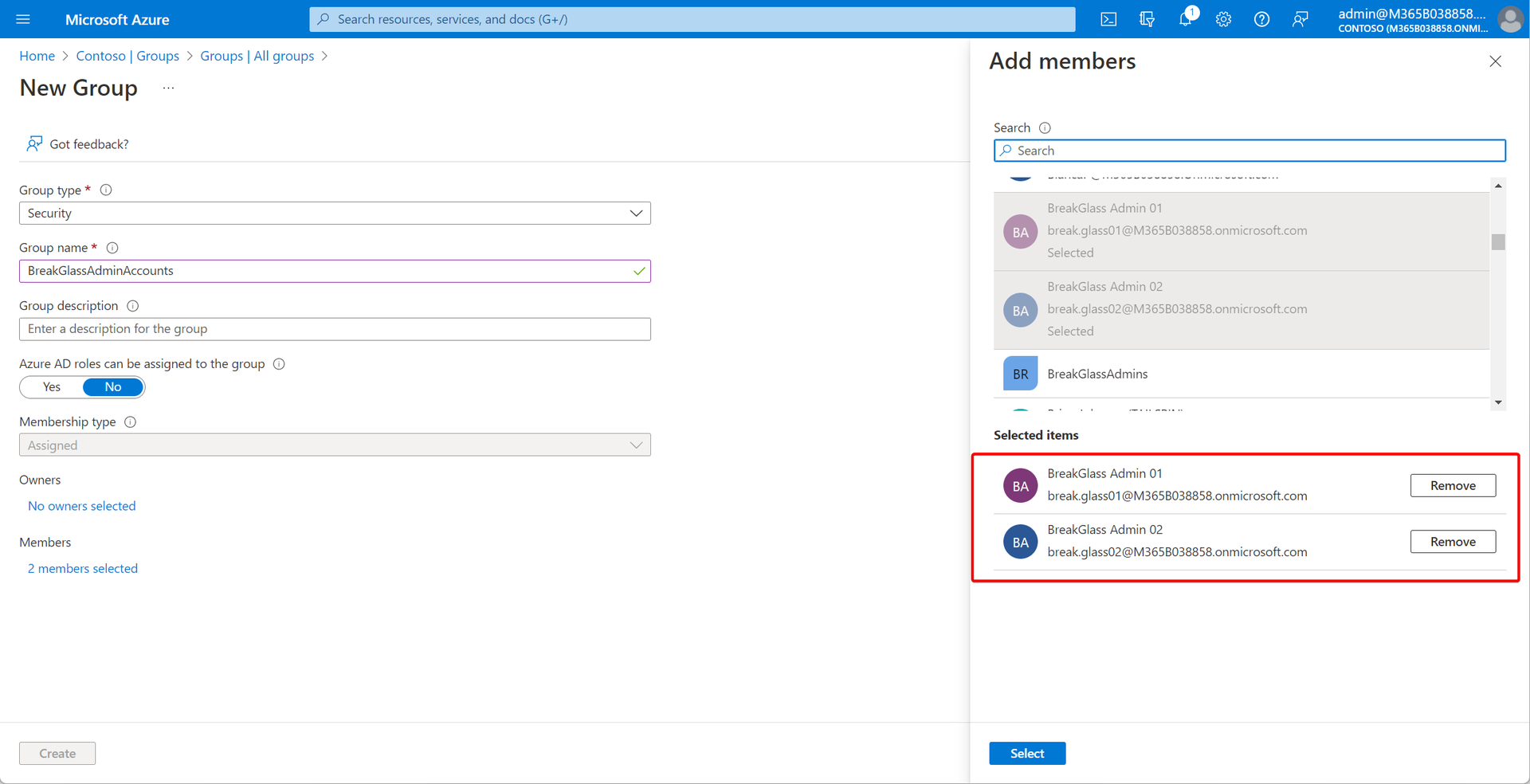
1. I Always Create Two Break-Glass Accounts
Not one—two.
Why?
One account can get locked, compromised, or misconfigured
Two gives redundancy during real incidents
I name them something obvious but not attention-grabbing, for example:
emergency-admin-01
emergency-admin-02
2. Global Administrator — But Nothing Else
Each break-glass account:
Has Global Administrator
Is not used for daily admin work
Is not synced from on-prem AD
Is cloud-only
No email mailbox, no Teams, no OneDrive usage.
3. Excluded from Conditional Access (Yes, Intentionally)
This is the part that makes people uncomfortable—and it should.
I explicitly exclude break-glass accounts from:
MFA policies
Location restrictions
Device compliance requirements
Risk-based Conditional Access
Why?
Because these controls are exactly what might fail or misfire during an incident.
⚠️ Important:
Exclusion does not mean weak security—it means controlled emergency access.
4. Extremely Strong Passwords (Stored Offline)
Since MFA is not enforced, password strength matters.
What I do:
25–30 character random passwords
Stored in offline password vaults
Access limited to senior admins only
Never reused anywhere else
If someone can’t explain where this password is stored, that’s a red flag.
5. Continuous Monitoring (Non-Negotiable)
Break-glass accounts should never be used silently.
I always:
Enable sign-in alerts
Monitor usage in Entra sign-in logs
Create alerts for any successful login
If a break-glass account signs in, I want to know immediately.
Common Mistakes I See All the Time
Here’s what I regularly fix in existing tenants:
❌ Only one break-glass account
❌ MFA enabled “by policy” with no exclusions
❌ Password stored in someone’s personal password manager
❌ Account used for “quick admin tasks”
❌ No monitoring or alerting
A break-glass account that’s casually used is not a break-glass account.
Should SMBs Care About This Too?
Absolutely.
Small tenants are often more vulnerable:
Fewer admins
Less testing
Changes made directly in production
No rollback plans
I treat a 10-user tenant the same way as a 10,000-user tenant when it comes to emergency access.
Final Thoughts
Break-glass accounts are boring—until the day they aren’t.
They don’t show up on dashboards.
They don’t improve security scores.
They don’t look impressive.
But they are the difference between:
“We’re locked out”
and
“We’re back in within 5 minutes.”
I write more hands-on Microsoft identity and security lessons like this at ITBlogs.ca, based on what I actually see while managing tenants day to day.
Author: Jaspreet Singh
Identity & Cloud Security Engineer
Author @ ITBlogs.ca
References
(2025). Emergency Recovery: What to Do When Your Global Admin for Office 365 A1 is Deleted. SilverPC Blog. https://blog.silverpc.hu/2025/10/22/emergency-recovery-what-to-do-when-your-global-admin-for-office-365-a1-is-deleted/
(August 10, 2020). Microsoft Office 365—Do you have a false sense of cloud security?. Microsoft Security Blog. https://www.microsoft.com/en-us/security/blog/2020/08/11/microsoft-office-365-do-you-have-a-false-sense-of-cloud-security/
(2024). Manage emergency access admin accounts in Microsoft Entra ID. Microsoft Learn. https://learn.microsoft.com/en-us/azure/active-directory/roles/security-emergency-access
(2024). Risk policies - Microsoft Entra ID Protection | Microsoft Learn. Microsoft Learn. https://learn.microsoft.com/en-us/azure/active-directory/identity-protection/howto-identity-protection-configure-risk-policies
(2025). Securing Break Glass Accounts in Microsoft 365. Cloud. https://cloud.jiscinvolve.org/wp/2025/08/27/securing-break-glass-accounts-in-microsoft-365/
(2025). What are Microsoft Entra sign-in logs?. Microsoft Entra ID | Microsoft Learn. https://learn.microsoft.com/en-us/azure/active-directory/reports-monitoring/concept-sign-ins
(2024). Security operations for privileged accounts in Microsoft Entra ID. Microsoft Entra | Microsoft Learn. https://learn.microsoft.com/en-us/entra/architecture/security-operations-privileged-accounts
(2024). Manage emergency access admin accounts - Microsoft Entra ID. Microsoft Learn. https://learn.microsoft.com/en-us/azure/active-directory/roles/security-emergency-access