🔐 Zero Trust Security Explained: A Practical Guide for Small & Medium Businesses

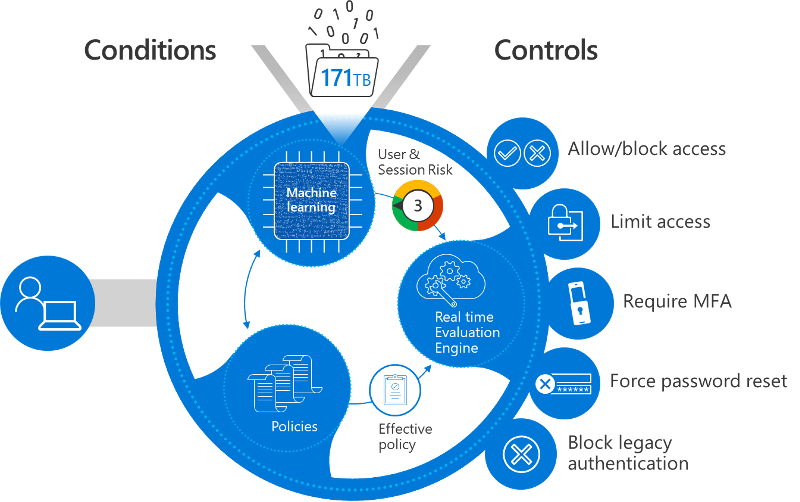 4
4
Introduction
Cyberattacks are no longer targeting only large enterprises. Small and medium businesses (SMBs) are now prime targets due to limited security controls and growing cloud adoption.
This is where Zero Trust Security comes in.
Instead of trusting users or devices simply because they’re inside the network, Zero Trust follows one simple rule:
Never trust, always verify.
In this blog, we’ll break down Zero Trust in simple terms and show how SMBs can realistically adopt it without overcomplicating security.
What Is Zero Trust Security?
Zero Trust is a modern security framework that assumes every access request is a potential threat, whether it comes from inside or outside the organization.
Unlike the traditional “castle and moat” model, Zero Trust focuses on:
Identity
Device health
Location
Risk level
Continuous verification
Why Traditional Security No Longer Works
Traditional security models rely heavily on:
VPNs
Network perimeter firewalls
Implicit trust once logged in
The problem?
Cloud apps live outside the network
Employees work remotely
Credentials are easily compromised
Malware can move laterally once inside
Zero Trust closes these gaps.
Core Principles of Zero Trust
1️⃣ Verify Identity Every Time
Access is granted only after confirming:
User identity
MFA status
Risk signals
2️⃣ Device Trust Matters
Only compliant and healthy devices should access company resources.
3️⃣ Least Privilege Access
Users get only the access they need, nothing more.
4️⃣ Assume Breach
Security policies are designed assuming attackers may already be inside.
Zero Trust in the Real World (Practical Example)
Imagine an employee signing in to email:
| Scenario | Result |
|---|---|
| Known user + managed laptop + trusted location | ✅ Access allowed |
| Known user + personal device | ⚠️ Limited access |
| Unknown location + high-risk sign-in | ❌ Access blocked |
This decision happens automatically, in real time.
How SMBs Can Start with Zero Trust
You don’t need enterprise-level budgets to begin.
Step 1: Secure Identities
Enforce Multi-Factor Authentication (MFA)
Disable legacy authentication protocols
Step 2: Use Conditional Access
Policies that decide access based on:
Location
Device compliance
Risk level
Step 3: Manage Devices
Enroll devices
Enforce disk encryption, updates, and antivirus
Step 4: Monitor & Improve
Review sign-in logs
Adjust policies based on threats
Tools That Enable Zero Trust
Most SMBs already own Zero Trust–capable tools without realizing it.
For example, platforms from Microsoft allow businesses to:
Enforce MFA
Apply Conditional Access
Monitor risky sign-ins
Secure cloud apps
The key is proper configuration, not just licensing.
Common Zero Trust Myths
❌ “Zero Trust is too complex”
✅ It can be rolled out in phases
❌ “It will slow users down”
✅ Smart policies reduce friction
❌ “Only enterprises need it”
✅ SMBs are the most targeted
Final Thoughts
Zero Trust is not a product—it’s a mindset shift.
By focusing on identity, devices, and continuous verification, SMBs can significantly reduce cyber risk while supporting remote and hybrid work.
If you’re not moving toward Zero Trust, attackers are already moving toward you.